

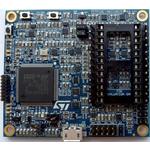
STEVAL-MKI109V3
ObsoletePROFESSIONAL MEMS TOOL: ST MEMS ADAPTERS MOTHERBOARD BASED ON THE STM32F401VE AND COMPATIBLE WITH ALL ST MEMS ADAPTERS
STEVAL-MKI109V3
ObsoletePROFESSIONAL MEMS TOOL: ST MEMS ADAPTERS MOTHERBOARD BASED ON THE STM32F401VE AND COMPATIBLE WITH ALL ST MEMS ADAPTERS
Technical Specifications
Parameters and characteristics for this part
| Specification | STEVAL-MKI109V3 |
|---|---|
| Contents | Board(s) |
| Core Processor | ARM® Cortex®-M4 |
| Mounting Type | Fixed |
| Platform | Professional MEMS Tool |
| Type | MCU 32-Bit |
| Utilized IC / Part | STM32F401VE |
Pricing
Prices provided here are for design reference only. For realtime values and availability, please visit the distributors directly
| Distributor | Package | Quantity | $ | |
|---|---|---|---|---|
| Digikey | N/A | 0 | $ 88.40 | |
Description
General part information
STEVAL-MKI109V3 Series
ST's ready-to-use MEMS motherboard (STEVAL-MKI109V3) development platform lets engineers monitor the behavior of ST MEMS sensors, which can help accelerate time to market and maximize the performance of new product designs. This board is compatible with ST MEMS adapter boards and supports I2C and SPI data modes for very high output data rates.
This professional MEMS tool features a high-performance STM32F401VE microcontroller and flexible power management with software-adjustable power circuitry that allows you to set the sensor supply voltage from 0 to 3.6 V and replicate the operating conditions in the intended application. The board includes accurate power monitoring on sensor supply voltage and current, so external instruments are not required.
You can run a graphical user interface (GUI) like Unico GUI (STSW-MKI109L for Linux, STSW-MKI109M for Mac OSX and STSW-MKI109W for Windows), on a host PC to manage data flow from MEMS sensors and analyze MEMS sensor waveforms, which can help you explore the operating modes and power settings to optimize sensor performance and accuracy in your application.
Documents
Technical documentation and resources